
Choosing a smart home platform is less about buying one speaker than deciding how lights, plugs, sensors, cameras, and voice assistants will work together. Amazon Alexa and Google Home are the two familiar starting points, and both can control common devices, run routines, and answer spoken requests. Their real difference is emphasis: Alexa generally offers wider device and skill compatibility, while Google Home fits more naturally into a household built around Google services and Android.

Get the little things that make your day delivered free with Prime
- Fast, free delivery on millions of items
- Prime Video, Amazon Music and more included
- Member-only deals all year
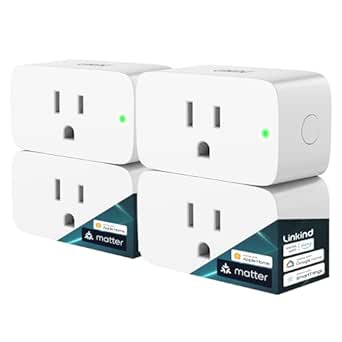
Linkind Matter Smart Plug, 4-Pack
- ✔ Pack size: 4 plugs
- ✔ Connectivity: Matter; 2.4 GHz Wi-Fi; IPv6
- ✔ Voice and platform support: Apple Home/Siri, Amazon Alexa, Google Assistant, SmartThings

Kasa Smart Wi-Fi Plug HS103P4, 4-Pack
- ✔ Pack size: 4 plugs
- ✔ Model: HS103P4
- ✔ Connectivity: 2.4 GHz Wi-Fi

Amazon Echo Show 5 Smart Display with Alexa, Charcoal
- ✔ Display: 5.5-inch touchscreen
- ✔ Camera: 2 MP with built-in shutter
- ✔ Speaker: 1.75-inch full-range speaker
That distinction matters as a home grows. A household with mixed brands, specialized accessories, and custom automations may find Alexa easier to extend. Someone who already uses Google Calendar, Maps, YouTube, or Android may prefer Google Home’s connected experience. Neither platform guarantees that every product will work, and privacy settings, regional availability, and specific device models still matter. The comparisons below focus on the decision most buyers face: which ecosystem is likely to make everyday control easier without locking them into features they do not need.
At a Glance
| Criteria | Amazon Alexa | Google Home | Winner |
|---|---|---|---|
| Device compatibility | Broad selection across many smart home brands; check product support before buying. | Supports many mainstream brands, though some niche products or integrations may be less convenient. | A |
| Voice control | Alexa handles common commands well, though phrasing and results can vary by device and skill. | A strong choice for natural requests and households using Android or Google Assistant features. | Depends |
| Google service integration | Works with Google services, but they are not the platform’s central advantage. | Strong fit with services such as Calendar, Maps, YouTube, and Android. | B |
| Routines and automation | Flexible routines and a large range of compatible accessories support varied setups. | Supports useful household routines; setup and available actions depend on devices and region. | A |
| Third party services | Extensive Alexa skills and integrations, with quality varying across services. | Useful integrations, though the Alexa ecosystem is generally broader. | A |
| Privacy controls | Settings and controls are available, but buyers should review voice recording and data options. | Offers account and voice activity controls; review settings and connected services. | Tie |
| Value and expansion | Often an affordable way to start, with many speaker and accessory price points. | Good value when Google services are already part of daily life; hardware prices vary. | Depends |
Linkind Matter Smart Plug, 4-Pack
For households building around more than one smart home ecosystem, the Linkind Matter Smart Plug four-pack offers the most flexible foundation in this group. It supports Apple Home, Alexa, Google Home, SmartThings, and the AiDot app, giving it a wider platform reach than the Kasa plug, which lists Alexa and Google Assistant. That breadth can matter when family members use different assistants or when you want to choose a platform before buying into a whole set of devices.Schedules, timers, remote control, and voice commands cover the practical basics of automating lamps and other compatible appliances. Linkind also states that the plug can be controlled over the local network when internet access is unavailable, a useful distinction for some control situations. Its 15 A, 1800 W capacity and short-circuit and overload protection speak to appliance compatibility and protection, though buyers should still check that a connected device’s requirements fit the plug’s stated limits.The main catch is setup: the plug uses 2.4 GHz Wi-Fi and IPv6, and a Matter-certified hub or controller is required for Apple Home, Alexa, Google Home, and SmartThings. The Kasa pack avoids a hub for its listed assistants, so it may be a smoother purchase for someone with a basic Alexa or Google setup. Linkind is our best overall pick when platform choice matters enough to justify checking network and hub compatibility first.
Pros:
- Supports Matter and several smart home platforms, including Apple Home and SmartThings.
- Offers schedules, timers, voice commands, and remote control.
- Can be controlled over the local network when internet access is unavailable.
- Compact fire-resistant design with short-circuit and overload protection.
Cons:
- A Matter-certified hub or controller is required for the listed major platforms.
- Requires a 2.4 GHz Wi-Fi network and IPv6.
Best for: Households using, or planning to use, a Matter-certified controller and wanting smart plugs to work across several named platforms.
Not ideal for: Buyers without a compatible hub who want the quickest path to Alexa or Google Assistant control, or anyone without 2.4 GHz Wi-Fi and IPv6.
Bottom line: We recommend Linkind for the broadest platform flexibility in this group, provided your network and hub are ready for Matter.
“We recommend Linkind for the broadest platform flexibility in this group, provided your network and hub are ready for Matter.”
Kasa Smart Wi-Fi Plug HS103P4, 4-Pack
When the goal is to put lamps, fans, or other compatible appliances on a schedule, Kasa’s HS103P4 four-pack keeps the setup relatively direct. It works with Alexa and Google Assistant without requiring a hub, a practical advantage over the Linkind pack for buyers who already use one of those assistants and want plug control without adding a Matter controller. The Kasa app handles remote control, schedules, and timers, so everyday automation does not depend on voice commands.The tradeoff is a narrower ecosystem. Linkind names Apple Home and SmartThings support alongside Alexa and Google Home, while Kasa lists Alexa and Google Assistant. That makes Kasa a better fit for a settled two-assistant setup than for a household trying to keep its options open across platforms. Its 2.4 GHz Wi-Fi requirement and need for a compatible phone or tablet with the Kasa app are also part of the setup, even though the plug itself needs no hub.At 1800 W and 120 V AC, the stated capacity suits many common household plug-in devices, subject to checking each appliance’s requirements. UL certification is a useful specification to consider when comparing plug-in hardware. Choose Kasa over the Linkind pack when simple Alexa or Google control is the priority; choose Linkind when broader platform support justifies the extra hub and network checks.
Pros:
- Controls devices remotely and supports voice commands, schedules, and timers.
- Works with Alexa and Google Assistant without a hub.
- Four plugs let buyers automate several appliances from one pack.
- UL certified.
Cons:
- Requires a 2.4 GHz Wi-Fi connection.
- Setup and app control require a compatible Android or iOS device and the Kasa app.
- Its listed assistant support is narrower than Linkind’s multi-platform support.
Best for: Alexa or Google Assistant households that want four app-controlled, schedulable plugs and do not want to buy a hub.
Not ideal for: Buyers who want Apple Home or SmartThings support, Matter compatibility, or a plug that can be set up without the Kasa app.
Bottom line: Kasa is the simpler hub-free plug pack for Alexa and Google homes, but it offers less ecosystem flexibility than Linkind.
“Kasa is the simpler hub-free plug pack for Alexa and Google homes, but it offers less ecosystem flexibility than Linkind.”
Amazon Echo Show 5 Smart Display with Alexa, Charcoal
The Echo Show 5 is the pick for buyers who want smart home controls in a visible, voice-enabled device rather than another plug. Its 5.5-inch touchscreen and built-in speaker can put compatible-device controls and content in one place; the 2 MP camera adds video calls and viewing of compatible cameras. That makes it more versatile around a bedside table or kitchen counter than either four-pack, though it does not automate an appliance by switching its power on a schedule in the way a smart plug can.Compared with Kasa’s Alexa-compatible plugs, the Echo Show 5 gives Alexa a screen and camera rather than simply extending voice control to outlets. Compared with Linkind, it does not offer the same listed support across Apple Home, Google Home, and SmartThings: its smart home role is centered on Alexa. Buyers who want a visual Alexa control point may value that focus; shoppers seeking platform-neutral outlet automation should look at one of the plug packs instead.Privacy controls include a camera shutter and a button to turn off the microphone and camera. Those controls help address concerns about a device with a camera in shared spaces, though buyers still need to decide whether that form factor suits the room. Some skills and services may involve subscriptions or other fees, and the device does not support ad-hoc or peer-to-peer Wi-Fi networks. Its recycled fabric yarn and aluminum, plus recyclable packaging, are additional material details rather than a substitute for checking compatibility and use needs.
Pros:
- 5.5-inch touchscreen offers a visible way to manage compatible smart home devices.
- Built-in camera supports video calls and compatible camera viewing.
- Camera shutter and microphone/camera off button provide privacy controls.
- Uses recycled fabric yarn and aluminum, with recyclable packaging.
Cons:
- Its smart home control is centered on Alexa rather than the broader platform mix listed for Linkind.
- Some skills and services may require subscriptions or other fees.
- Does not support ad-hoc or peer-to-peer Wi-Fi networks.
Best for: Alexa households that want a compact touchscreen for compatible smart home controls, video calls, and on-screen content.
Not ideal for: Buyers whose main need is automated outlet control, who want broad multi-platform support, or who do not want a camera-equipped device in the room.
Bottom line: Choose Echo Show 5 when a screen and camera make Alexa control more useful; choose a plug pack when appliance automation is the priority.
“Choose Echo Show 5 when a screen and camera make Alexa control more useful; choose a plug pack when appliance automation is the priority.”
As an Amazon Associate we earn from qualifying purchases.
Key Differences
The most practical difference is how readily each platform accommodates a varied smart home. Alexa’s larger ecosystem of compatible products and skills can make it easier to combine devices from different makers or add less common functions. That breadth is useful when a home already contains several brands or when the owner wants room to experiment. It also means more choice when shopping, although compatibility labels and specific feature support deserve attention before purchase.
Google Home’s clearest advantage is its fit with Google’s services and Android. People who already use those tools may find voice requests, calendars, media, and household controls more coherent under one account. Alexa remains capable for everyday commands, but its strength is more about range and customization. Both can handle straightforward lighting, plugs, and speaker control; the gap grows when buyers prioritize a particular service, accessory, or automation style.
Neither is automatically the better value. An inexpensive speaker can be a poor buy if it does not control the devices or services a household uses. Likewise, paying more for premium audio or a display makes sense only when those features will be used. For most buyers, choosing the platform that matches existing accounts and devices matters more than chasing the longest feature list.
Detailed Comparison
Device compatibility (Amazon Alexa wins — moderate)
Alexa wins, with a moderate advantage. Both platforms support many widely sold lights, plugs, locks, and thermostats, but Alexa’s broader partner and skill ecosystem tends to offer more paths for mixed-brand setups. In practice, this can reduce the chance that a buyer must replace a working accessory to make it part of a routine. Google Home is sufficient for common products, but owners of niche devices should confirm the exact model and functions supported before committing.
Voice control (moderate difference)
The winner depends on the household and request. Google Home is an appealing choice for people who make conversational requests and already use Android or Google Assistant features. Alexa is dependable for common commands and has a wide range of device skills, but more specialized tasks may depend on a particular integration. The difference is moderate for daily use, though neither assistant will understand every phrasing or control every feature equally well.
Google service integration (Google Home wins — major)
Google Home wins by a major margin. Its natural fit with services such as Calendar, Maps, YouTube, and Android can make the assistant more useful for people already living in Google’s ecosystem. Alexa can connect to some Google services and other accounts, but that is not its defining strength. If household calendars, media, and phones already center on Google, this difference can outweigh a wider accessory catalog.
Routines and automation (Amazon Alexa wins — moderate)
Alexa has a moderate edge for breadth. Its routines and wide device support give experienced users more opportunities to combine actions across different accessories and services. Google Home also supports household routines and covers the common jobs most people want, such as turning lights off at bedtime. The practical gap matters most to people building detailed automations; for a simple schedule or voice-triggered scene, either can be enough.
Third party services (Amazon Alexa wins — moderate)
Alexa wins by a moderate margin. Its skills and integrations offer more ways to connect services and add functions, although availability and quality vary. Google Home is strong where Google’s own services or mainstream integrations are involved. For a household that wants to add unusual services or experiment with extensions, Alexa offers more options; for a household that uses a few familiar services, the difference may be minor.
Privacy controls (moderate difference)
This is a tie at the platform level. Both providers offer account settings for voice activity and connected services, and both require trust in a cloud linked assistant if voice control is central to the setup. The practical outcome depends on which recording controls, account settings, and device features a buyer chooses. Review those controls on the specific account and hardware before adding speakers to private spaces; neither name alone settles the privacy decision.
Value and expansion (moderate difference)
There is no universal price winner. Both ecosystems include hardware at different price points, and promotions or regional availability can change the comparison. Alexa often makes an inexpensive starting point with many compatible products; Google Home can be better value for someone who gets daily use from its Google connections. Pay extra for a screen, stronger sound, or premium sensors only when those features solve a real household need.
Amazon Alexa: Pros and Cons
Pros:
- Broad compatibility across smart home brands and accessories.
- Large selection of skills and third party integrations.
- Flexible routines for households that want to connect many devices.
- Entry level hardware and compatible products are available at varied prices.
Cons:
- The range of skills can make quality and setup less consistent.
- Google services are not its central advantage.
- Some device functions still depend on exact model support and account setup.
Google Home: Pros and Cons
Pros:
- Strong fit with Android and Google services.
- Useful voice control for households already using Google accounts and apps.
- Supports common smart home devices and everyday routines.
- Can deliver more value when its service integration replaces separate steps.
Cons:
- Some niche products and services may have fewer integration options.
- Less breadth than Alexa for skills and third party extensions.
- Supported features vary by device, region, and software.
Who Should Choose What
Choose Amazon Alexa if:
- You have devices from several brands and want broad odds of compatibility.
- You plan to build varied routines or use third party skills.
- You want an inexpensive starting point with room to add accessories.
Choose Google Home if:
- Your household uses Android, Google Calendar, YouTube, or other Google services every day.
- You value an assistant that fits into your existing Google accounts and routines.
- Your smart home needs are mainstream and service integration matters more than the widest accessory catalog.
Skip both if: Skip both if you do not want cloud linked voice control or app based ecosystems; use compatible devices with local controls or a locally managed hub instead.
Value for Money
Paying more is worthwhile only when the additional hardware or ecosystem feature will see regular use. A premium speaker makes sense if sound quality matters in that room; a display can help with camera feeds, recipes, or visual controls. For simple lighting and plug control, a basic compatible speaker or hub is usually enough. Alexa is often the more flexible value for shoppers adding varied accessories over time, while Google Home can be the better value for users who rely on Google services daily. Compare the total cost of the speaker, hub requirements, and accessories rather than treating the assistant device as the whole purchase.
Final Verdict
For most households building a mixed-brand smart home from scratch, choose Amazon Alexa: its wider compatibility and larger integration catalog provide more room to expand. Choose Google Home if your phones, calendars, media, and daily routines already center on Google; that existing fit is more valuable than extra integrations you may never use. The deciding factor is the ecosystem your household already uses and the devices you intend to control. If you only need basic lights and plugs, either platform is capable, so choose the lower total cost for hardware that supports your exact devices.
Frequently Asked Questions
Can Alexa and Google Home control the same smart home devices?
Many mainstream products support both, but support varies by brand, model, region, and feature. Check the device’s compatibility information for the exact functions you need, such as dimming, camera viewing, or sensor status.
Which is better for someone with an Android phone?
Google Home is usually the more natural fit because it connects closely with Android and Google services. Alexa can still control compatible smart home devices, so the choice depends on whether those service connections matter in daily use.
Is Alexa better for a large smart home?
Alexa’s broad device and skill ecosystem can make it a strong choice for a large setup with varied brands and custom routines. The number of devices alone does not decide it: confirm that the exact models and features work together before buying.
Is it worth paying more for a smart display?
Pay more if you will regularly use video feeds, visual controls, media, or on screen information. If you mainly issue voice commands for lights and plugs, an entry level speaker or another compatible controller is generally better value.