

The right ergonomic laptop stand can turn hours of hunched-over studying into a far healthier setup, and after comparing 14 popular models, the Besign LSX7 earns my top spot for its rare combination of 360° rotation, solid height range, and a foldable design that survives dorm-to-library life. Students on tighter budgets should look at the Amazon Basics Portable Ergonomic Stand, which covers the essentials for a fraction of the price, while the Lamicall Aluminum Stand is the sturdiest permanent-desk option if you rarely move your workstation. The main tradeoffs in this category come down to portability versus stability, adjustability versus price, and whether a rotating base is a genuine study aid or an unused gimmick. Below, I break down every pick, who each one suits, and who should skip it.

Get the little things that make your day delivered free with Prime
- Fast, free delivery on millions of items
- Prime Video, Amazon Music and more included
- Member-only deals all year
Key Takeaways
- The Besign LSX7 won best overall because it is the only top-tier pick combining a 360° rotating base, a wide height range, and a foldable frame — most rivals force you to choose two of the three.
- Rotating bases (Besign LSX7, LOXP, and others) proved more useful for students than expected, since sharing notes or turning a screen toward a study group happens daily — but they add wobble that fixed stands like the Lamicall avoid.
- Budget models under $25, including the Amazon Basics and OImaster stands, deliver roughly 80% of the ergonomic benefit; what you give up is smooth height adjustment, long-term hinge durability, and compatibility with larger 17-inch laptops.
- Aluminum one-piece designs (Lamicall, MOKURU, Besign LS03) were noticeably more stable and better at heat dissipation than folding metal risers, but their fixed or limited angles make them poor choices for students who move between dorm, library, and class.
- Most stands in this roundup share a weakness: the lowest height setting is still too tall for comfortable typing without an external keyboard — factor that accessory cost into your total budget.
| Besign LSX7 Laptop Stand with 360° Rotating Base |  | Best Overall | Compatibility: 10-15.6 inch laptops | Material: Metal | Support Weight: 13 lbs | VIEW LATEST PRICE | See Our Full Breakdown |
| Tonmom Adjustable Laptop Stand for Desk |  | Best Value for Portability | Height Adjustment: 2.78″ to 6.5″ | Weight: 0.53 pounds | Folded Size: 10.5″ x 1.96″ x 0.68″ | VIEW LATEST PRICE | See Our Full Breakdown |
| MOKURU Aluminum Laptop Stand for Desk |  | Best for Large Laptops | Material: Aluminum alloy | Height Adjustment: Raises screen by 2.5 inches | Keyboard Tilt: 17 degrees | VIEW LATEST PRICE | See Our Full Breakdown |
| Ergonomic Adjustable Laptop Stand with Phone Holder |  | Best for Multitaskers | Height Adjustment: 8 levels (5.5″ to 7.0″) | Material: Aircraft-grade ABS, silicone pads | Compatibility: 10-17″ laptops and tablets | VIEW LATEST PRICE | See Our Full Breakdown |
| Besign LS03 Aluminum Laptop Stand |  | Best Set-and-Forget Desk Pick | Compatibility: 10-15.6 inch laptops | Material: Aluminum alloy | Maximum Load: 8.8 lbs | VIEW LATEST PRICE | See Our Full Breakdown |
| LOXP Adjustable Laptop Stand with 360° Rotating Base |  | Best for Group Study Sessions | Material: Fiber metal | Rotation: 360° | Supported Laptop Size: 10-16 inches | VIEW LATEST PRICE | See Our Full Breakdown |
| Amazon Basics Sturdy and Portable Ergonomic Laptop Stand for Desk |  | Best Value Pick | Height Adjustment: Up to 7 inches | Supported Devices: Laptops and tablets 10-15.6 inches | Material: Lightweight, rust-resistant aluminum | VIEW LATEST PRICE | See Our Full Breakdown |
| Laptop Stand for Desk (360° Rotating), Aluminum Laptop Riser |  | Best Tallest Adjustment | Material: Aluminum alloy | Maximum Height: Up to 11.81 inches | Rotation: 360° | VIEW LATEST PRICE | See Our Full Breakdown |
| Adjustable Laptop Stand for Desk, Metal Laptop Riser Holder |  | Best Weight Capacity | Material: Metal | Maximum Support Weight: 17.6 lbs (8 kg) | Supported Devices: Laptops 10-15.6 inches, tablets | VIEW LATEST PRICE | See Our Full Breakdown |
| Lamicall Aluminum Laptop Stand for Desk |  | Best Device Compatibility | Compatibility: Laptops 10″ to 17.3″ including MacBook, Surface, Dell, HP, Chromebook | Material: Aluminum alloy | Dimensions: 12 x 10 x 2 inches | VIEW LATEST PRICE | See Our Full Breakdown |
| OImaster Laptop Stand for Desk, Adjustable & Foldable Portable Computer Stand with Heat-Vent for 10-15.6 Inch Notebooks | 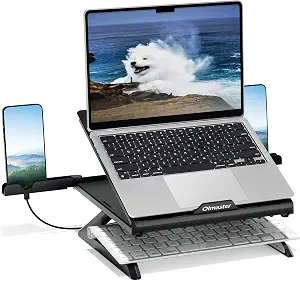 | Best Budget Pick for Dorm Desks | Compatibility: 10-15.6 inch notebooks | Adjustability: Multiple adjustable angles | Foldable: Yes | VIEW LATEST PRICE | See Our Full Breakdown |
| LOXP Adjustable Laptop Stand for Desk, Portable Airflow Laptop Riser Holder |  | Best for Campus Commuters | Maximum Load: 15.4 lbs (7 kg) | Supported Laptop Size: Up to 15.6 inches | Material: Sturdy metal | VIEW LATEST PRICE | See Our Full Breakdown |
| Laptop Stand for Desk, Adjustable and Foldable Metal Riser |  | Best Value All-Rounder | Support Weight: 17.6 lbs (8 kg) | Material: ABS, Aluminum, Silicone | Compatible Devices: Laptops 10-15.6 inches, Tablets | VIEW LATEST PRICE | See Our Full Breakdown |
| Nulaxy Ergonomic Adjustable Laptop Stand for Desk, Dual Foldable Computer Riser with Advanced Heat-Vent, Heavy-Duty Portable Notebook Holder for Posture Correction |  | Best Overall for Heavy Daily Use | Compatibility: 10-16 inch laptops | Maximum Load: 22 lbs (10 kg) | Material: Metal | VIEW LATEST PRICE | See Our Full Breakdown |
| ergonomic laptop stands for student | Material | Compatibility | Color |
|---|---|---|---|
| Besign LSX7 Laptop Stand with | Metal | 10-15.6 inch laptops | Black |
| Tonmom Adjustable Laptop Stand | — | 10-15.6 inch laptops | Black |
| MOKURU Aluminum Laptop Stand f | Aluminum alloy | 10-17.3 inch laptops | Silver |
| Ergonomic Adjustable Laptop St | Aircraft-grade ABS, silicone pads | 10-17" laptops and tablets | — |
| Besign LS03 Aluminum Laptop St | Aluminum alloy | 10-15.6 inch laptops | Silver |
| LOXP Adjustable Laptop Stand w | Fiber metal | — | — |
| Amazon Basics Sturdy and Porta | Lightweight, rust-resistant aluminum | — | — |
| Laptop Stand for Desk | Aluminum alloy | 10-16 inch laptops and tablets | — |
| Adjustable Laptop Stand for De | Metal | — | Black |
| Lamicall Aluminum Laptop Stand | Aluminum alloy | Laptops 10" to 17.3" including MacBook, Surface, Dell, HP, Chromebook | Silver |
| OImaster Laptop Stand for Desk | High-quality materials (unspecified) | 10-15.6 inch notebooks | — |
| LOXP Adjustable Laptop Stand f | Sturdy metal | MacBook, Pixelbook, Dell XPS, HP, ASUS, Lenovo ThinkPad, Acer, Chromebook, Surface | — |
| Laptop Stand for Desk | ABS, Aluminum, Silicone | — | — |
| Nulaxy Ergonomic Adjustable La | Metal | 10-16 inch laptops | Silver |
More Details on Our Top Picks
Besign LSX7 Laptop Stand with 360° Rotating Base
When I compare every option here side by side, the Besign LSX7 stands out as the most complete package for a student desk. The 360° rotating base is the feature that separates it from the MOKURU Aluminum Stand — instead of lifting your laptop off the desk to show a roommate a note or reposition mid-lecture, you just spin it. Combined with both height and angle adjustability, it gives the widest range of ergonomic positions in this lineup, which matters for students alternating between typing, reading, and video calls.
The tradeoff: at a fixed desk footprint, it’s less travel-friendly than the Tonmom, which folds down much flatter. It also skips silicone padding details in its spec sheet, so desk-scratch protection is less certain.
Pros:- Both height and angle adjustability for true ergonomic tuning
- 360° rotating base for easy screen sharing
- 13 lb weight capacity handles heavy gaming laptops without wobble
- Open metal frame keeps the laptop cool during long study sessions
Cons:- No confirmed non-slip pads on the base
- Only available in black, and less compact than folding rivals
Best for: Students with a dedicated desk who want maximum adjustability and swivel flexibility for group work and video calls
Not ideal for: Students who carry their stand between classes daily — it’s less pocketable than the Tonmom’s 0.68-inch folded profile
- Compatibility:10-15.6 inch laptops
- Material:Metal
- Support Weight:13 lbs
- Rotation:360°
- Adjustability:Height and angle adjustable
- Color:Black
Our verdict“If you study at one main desk and want the most flexible ergonomics here, this is the stand to buy.”
Tonmom Adjustable Laptop Stand for Desk
At just 0.53 pounds and folding down to 0.68 inches thick, the Tonmom is the commuter’s pick of this batch. Compare that to the Besign LS03, which is sturdier on a desk but far less convenient to stuff in a backpack next to textbooks. The triangle support structure with anti-slip pads is a genuinely reassuring detail at this price — several cheap stands wobble the moment you type fast, and this one doesn’t.
The honest tradeoff is ergonomics: its height tops out at 6.5 inches, which is fine for most desks but falls short of taller users who need the screen closer to eye level. Unlike the Besign LSX7, there’s no rotation, so it’s a straight-ahead riser only.
Pros:- Ultralight at 0.53 lbs with a 0.68-inch folded profile
- Triangle support and anti-slip pads keep typing stable
- Height adjustable from 2.78 to 6.5 inches
- Very affordable compared with aluminum rivals
Cons:- Limited height range compared to taller risers
- Open frame offers no protection inside a crowded bag
- No rotating base or extras like a phone holder
Best for: Budget-minded students who move between library, lecture hall, and dorm and need a stand that lives in a backpack
Not ideal for: Taller students chasing perfect eye-level positioning — the 6.5-inch maximum lift won’t get there
- Height Adjustment:2.78″ to 6.5″
- Weight:0.53 pounds
- Folded Size:10.5″ x 1.96″ x 0.68″
- Compatibility:10-15.6 inch laptops
- Design:Foldable, anti-slip pads
- Color:Black
Our verdict“For students who need a stand that travels as much as they do without costing much, this is the smart pick.”
MOKURU Aluminum Laptop Stand for Desk
The MOKURU earns its spot with one number nobody else in this batch matches: compatibility up to 17.3-inch laptops. If you’re an engineering or design student with a big workstation-class machine, the Besign LS03 and Tonmom both cut off at 15.6 inches, which makes this the safer home for a heavier, wider chassis. The aluminum build and triangular structure translate into a planted, no-drama typing experience, and aluminum dissipates heat better than plastic designs like the 360° Rotating ABS stand.
The compromise is rigidity: the fixed 2.5-inch lift and 17-degree tilt mean you can’t dial in your height. You’ll also spend a few minutes with a screwdriver before first use.
Pros:- Widest compatibility in the lineup at 10-17.3 inches
- Aluminum construction runs cooler than plastic alternatives
- Very stable triangular base for steady typing
- 17-degree keyboard tilt eases wrist strain
Cons:- Requires assembly with four screws
- No adjustable height beyond the preset elevation
- Heavier and less portable than folding stands
Best for: Students with 16-17.3 inch laptops who need a wide, stable platform and don’t mind a fixed position
Not ideal for: Students who want to fine-tune screen height — this stand has one setting and one setting only
- Material:Aluminum alloy
- Height Adjustment:Raises screen by 2.5 inches
- Keyboard Tilt:17 degrees
- Compatibility:10-17.3 inch laptops
- Color:Silver
- Installation:Simple, requires four screws
Our verdict“Big-laptop students who prioritize stability over adjustability will get the most from this one.”
Ergonomic Adjustable Laptop Stand with Phone Holder
This is the only stand in the batch with a built-in phone holder, and for students juggling a laptop, a phone running a second screen app, and lecture slides, that small addition changes the workflow. It also borrows the 360° rotation from the Besign LSX7, so it works similarly for spinning a screen toward a study group. The 8-level height adjustment and 0.6-inch folded thickness make it a genuine hybrid of adjustability and portability.
But the aircraft-grade ABS plastic is the catch: compared with the metal MOKURU or Besign LS03, it’s less reassuring under a heavy 17-inch gaming laptop, and the surface can scratch over time. The 5.5 to 7-inch height range is also narrower than it sounds.
Pros:- Unique built-in phone holder for dual-screen workflows
- 360° rotation for screen sharing
- 8 height levels within a compact folding frame
- Silicone pads protect devices from scratches
Cons:- Plastic build is less stable under heavy laptops than metal rivals
- Height range (5.5″-7.0″) is narrower than the numbers suggest
- Surface may scratch over time
Best for: Students who multitask across a phone and laptop and want one foldable accessory that handles both
Not ideal for: Owners of heavy 17-inch gaming laptops — plastic construction and modest support make it a wobble risk
- Height Adjustment:8 levels (5.5″ to 7.0″)
- Material:Aircraft-grade ABS, silicone pads
- Compatibility:10-17″ laptops and tablets
- Folded Thickness:0.6″
- Rotation:360°
- Extras:Built-in phone holder
Our verdict“Multitasking students with standard-weight laptops get real convenience here; heavy-machine owners should look at metal options.”
Besign LS03 Aluminum Laptop Stand
The Besign LS03 makes the most sense for the student who sets up a desk once and doesn’t fiddle. Its aluminum frame lifts a laptop up to 5.7 inches, which is enough elevation to make a real posture difference, and the detachable, foldable design means it packs flat at semester’s end — more storage-friendly than the screw-together MOKURU, though less rigid once assembled. Like the LSX7 from the same brand, it’s built on an open, ventilated platform that keeps thermals in check during long sessions.
The limits are clear: an 8.8 lb load cap rules out chunkier gaming machines, and the 15.6-inch ceiling excludes the 17-inch crowd the MOKURU accommodates. Height adjustability is also more basic than the LSX7’s full range.
Pros:- Solid aluminum construction feels premium for the price
- 5.7-inch lift noticeably reduces neck strain
- Detachable and foldable for easy storage or moving out
- Open design keeps laptops cool
Cons:- 8.8 lb weight limit excludes heavier laptops
- Capped at 15.6-inch devices
- Less adjustable than the LSX7 from the same brand
Best for: Students with lightweight 13-15.6 inch laptops who want a durable, no-adjustment-needed desk riser
Not ideal for: Owners of heavy gaming or workstation laptops — the 8.8 lb limit is a real constraint
- Compatibility:10-15.6 inch laptops
- Material:Aluminum alloy
- Maximum Load:8.8 lbs
- Height Adjustment:Up to 14.5 cm / 5.7 inches
- Color:Silver
- Design:Detachable and foldable
Our verdict“A reliable, low-maintenance riser for standard-size laptops that earns its place through simplicity and build quality.”
LOXP Adjustable Laptop Stand with 360° Rotating Base
The standout feature here is the 360° rotating base, which makes this the rare laptop stand built for turning your screen toward a study partner without dragging the whole setup across the table. Compared with the Amazon Basics riser, which is fixed in position once you set it down, the LOXP gives students working on shared projects far more flexibility, and the foldable fiber metal frame packs down small enough for a backpack. Ergonomic adjustment covers both height and angle, so it holds its own for posture correction too. The tradeoff is durability versus rock-solid stability: on an uneven library table or a picnic bench outdoors, it can wobble where heavier rivals like the swivel-base aluminum stand below stay planted. It also caps out at 16 inches, so larger laptops are out.
Pros:- 360° rotation makes screen sharing effortless during group work
- Foldable, travel-friendly design fits in a backpack
- Adjustable height and angle support better neck posture
- Durable fiber metal construction
Cons:- Supports laptops only up to 16 inches
- Less stable on uneven surfaces than heavier aluminum stands
- Limited color options
Best for: Students who regularly study in groups and need to swivel their screen to share notes or slides
Not ideal for: Anyone with a laptop over 16 inches or who mostly works on soft or uneven surfaces like beds and couches
- Material:Fiber metal
- Rotation:360°
- Supported Laptop Size:10-16 inches
- Non-slip:Yes
- Foldable:Yes
- Adjustable:Height and angle
Our verdict“This pick makes the most sense for students who collaborate face-to-face and want a stand that rotates to share, rather than just a static riser.”
Amazon Basics Sturdy and Portable Ergonomic Laptop Stand for Desk
For students on a tight budget, this is the dependable no-frills option that does the ergonomic basics without padding the price. The adjustable riser lifts a laptop up to 7 inches, which is enough to bring a screen to eye level when paired with an external keyboard — the single biggest posture win for long essay sessions. Compared with the LOXP, you lose the rotating base, but the lightweight rust-resistant aluminum and ventilated platform actually keep things cooler and easier to carry at 1.7 lbs folded. Where it falls short is with heavier machines: a big 15.6-inch gaming laptop can make the riser feel tippy, and it genuinely needs a flat, solid desk to stay steady. For most students with a standard laptop, those limits rarely matter.
Pros:- Adjustable height up to 7 inches for eye-level viewing
- Open ventilation keeps laptops running cool
- Folds flat and weighs only 1.7 lbs for easy commuting
- Lightweight rust-resistant aluminum build
Cons:- Larger or heavier devices can reduce stability
- Requires a flat, solid surface for best performance
- No rotating base for screen sharing
Best for: Budget-conscious students who want a reliable, ventilated riser for a standard 13-15 inch laptop
Not ideal for: Owners of heavy 15.6-inch gaming laptops or anyone who often works on beds, couches, or other soft surfaces
- Height Adjustment:Up to 7 inches
- Supported Devices:Laptops and tablets 10-15.6 inches
- Material:Lightweight, rust-resistant aluminum
- Load Capacity:11 lbs (5 kg)
- Folded Size:10 x 8.7 x 1.8 inches
- Weight:1.7 lbs (0.77 kg)
Our verdict“If you want the cheapest sensible way to fix your posture at a dorm desk, this option stands out as the value benchmark everything else should be measured against.”
Laptop Stand for Desk (360° Rotating), Aluminum Laptop Riser
Height is where this model separates itself from the pack: it extends to 11.81 inches, comfortably out-lifting both the Amazon Basics riser (7 inches) and most budget rivals. For taller students, that extra elevation is the difference between a genuinely neutral neck angle and a compromise you feel after an all-nighter. Like the LOXP, it offers a 360° swivel base, but its heavier aluminum build makes it noticeably more planted when you spin the screen — a real advantage if your desk gets bumped in a shared room. The heavy base is also why it’s less backpack-friendly than it looks on paper. Drawbacks are real but manageable: the open frame collects dust, and the top of its range still isn’t tall enough for standing-desk use.
Pros:- Tallest adjustment in this batch at 11.81 inches
- Heavy base keeps the laptop rock-steady during 360° swivels
- Durable aluminum alloy construction
- Foldable for occasional travel
Cons:- Not compatible with laptops over 16 inches
- Open design can accumulate dust over time
- Height range still falls short for standing-desk setups
Best for: Taller students who need maximum screen elevation to avoid craning their necks downward
Not ideal for: Students who prioritize ultra-light carry — the weighted base that makes it stable also makes it heavier to lug daily
- Material:Aluminum alloy
- Maximum Height:Up to 11.81 inches
- Rotation:360°
- Compatibility:10-16 inch laptops and tablets
- Load Capacity:11 lbs
- Folded Size:9.45 x 9.45 x 1.25 inches
Our verdict“This model is better suited to tall students who found shorter risers like the Amazon Basics left them hunching, and who value stability over minimal weight.”
Adjustable Laptop Stand for Desk, Metal Laptop Riser Holder
With a 17.6 lb load rating, this metal riser out-muscles every stand in this batch — the Amazon Basics tops out at 11 lbs, which matters if your laptop is a chunky workstation-class machine with a metal chassis. At 780 g it sits in a sensible middle ground for weight, and the ventilated holes do their part to keep thermals in check during long rendering or gaming sessions. Compared with the swivel-base aluminum stand, there’s no rotation, but the folded footprint is smaller and simpler to stash in a cramped dorm. The honest tradeoff is in the folding mechanism itself: multiple moving joints under a heavy laptop introduce a bit of flex and occasional creak, and buyers report the hinges need to be tightened carefully. It’s a workhorse, not a precision instrument.
Pros:- Highest weight capacity in this batch at 17.6 lbs
- Ventilation holes help cool powerful laptops
- Folds compactly for transport between home and campus
- Sturdy all-metal construction
Cons:- Limited to 10-15.6 inch laptops
- Folding joints can feel less rigid under heavy loads
- No rotating base
Best for: Students with heavier gaming or workstation laptops who need a riser rated well above typical load limits
Not ideal for: Owners of laptops over 15.6 inches, or anyone bothered by slight flex and creaks from a multi-joint folding design
- Material:Metal
- Maximum Support Weight:17.6 lbs (8 kg)
- Supported Devices:Laptops 10-15.6 inches, tablets
- Weight:780 g
- Foldable:Yes
- Color:Black
Our verdict“Choose this stand if your laptop is heavy enough to make lighter risers wobble — skip it if you value a fully rigid, seamless frame.”
Lamicall Aluminum Laptop Stand for Desk
Most stands in this roundup stop at 15.6 or 16 inches, but the Lamicall stretches to 17.3 inches, covering the big-screen laptops and 17-inch Chromebooks that other picks simply can’t hold. That range, combined with a large stable base, is its whole argument: no shaking, no sliding, and no compatibility guesswork whether you own a MacBook Air, a Dell, or something enormous. The Amazon Basics stand is cheaper, but its 11 lb limit and 15.6-inch cap rule out exactly the laptops this one welcomes. Tradeoffs exist — the adjustment range is narrower than the swivel-base riser’s 11.81-inch maximum, so very tall students may still want more elevation, and silver is your only color choice. It’s also less about flashy features and more about quietly fitting everything you’ll own through four years of school.
Pros:- Widest compatibility in the roundup, from 10 to 17.3 inches
- Large stable base prevents wobble and sliding
- Aluminum design aids heat dissipation
- Portable and quick to set up anywhere
Cons:- Height adjustment range is more limited than taller risers
- Only available in silver
- May not accommodate unusually shaped laptops
Best for: Students with 16-17.3 inch laptops or Chromebooks who keep getting shut out by smaller stands
Not ideal for: Taller students needing very high elevation, or anyone wanting color options beyond silver
- Compatibility:Laptops 10″ to 17.3″ including MacBook, Surface, Dell, HP, Chromebook
- Material:Aluminum alloy
- Dimensions:12 x 10 x 2 inches
- Mounting Type:Tabletop
- Foldable:Yes
- Color:Silver
Our verdict“This pick makes the most sense for students whose large laptops don’t fit anything else here, provided they don’t need the tallest elevation.”
OImaster Laptop Stand for Desk, Adjustable & Foldable Portable Computer Stand with Heat-Vent for 10-15.6 Inch Notebooks
For students counting every dollar, this OImaster stand delivers the core ergonomic benefits — elevation, adjustable angles, and an open heat-vent design — without the premium pricing of the Nulaxy below. The foldable frame slips into a backpack alongside a notebook, which matters more for students moving between lecture halls than for someone outfitting a permanent home office. Compared with the LOXP model, it trades a published weight rating for a lighter overall build, so buyers get easier portability but less certainty about heavy laptops. Its 15.6-inch ceiling is standard for this price tier, though the MOKURU stand covers up to 17.3 inches for anyone with a bigger machine. The tradeoff is straightforward: fewer frills, no rotating base, and vague material specs mean you accept some unknowns in exchange for the low price.
Pros:- Very affordable entry point into ergonomic desk setup
- Open heat-vent design keeps thin ultrabooks cool during long study sessions
- Folds flat and weighs little, ideal for backpack carry
- Multiple adjustable angles let you dial in a comfortable viewing height
Cons:- No published maximum load, so durability with heavier laptops is uncertain
- Stops at 15.6 inches, excluding larger notebooks
- Material quality is unspecified, making longevity hard to judge
Best for: Budget-conscious students with 13-15 inch laptops who need a light, packable stand for dorm and library use
Not ideal for: Students with 16-inch or larger laptops or gaming machines, since the size cap and unverified load rating won’t inspire confidence
- Compatibility:10-15.6 inch notebooks
- Adjustability:Multiple adjustable angles
- Foldable:Yes
- Heat Vent:Open heat-vent design
- Weight:Lightweight
- Material:High-quality materials (unspecified)
Our verdict“A sensible low-cost choice for students with standard-size laptops who prioritize portability over build certainty.”
LOXP Adjustable Laptop Stand for Desk, Portable Airflow Laptop Riser Holder
This LOXP stand earns its spot as the travel-first option in the lineup. Its metal construction with non-slip pads gives it a firmer footing than the budget OImaster, while the foldable frame keeps it backpack-friendly — a balance that suits students who set up shop in a different library seat every day. The 7 kg load rating is a real advantage over stands that don’t publish one, though the Nulaxy model still out-muscles it at 10 kg. Its open airflow design keeps a throttling-prone ultrabook running at full speed during exam-week marathons. The catch: adjustability focuses on height and angle rather than extras, so unlike the rotating Besign LSX7, there’s no swiveling the screen toward a study group. Buyers who mostly share their screen or use external keyboards may want that rotation; solo workers won’t miss it.
Pros:- Published 7 kg load capacity for confidence with heavier machines
- Metal build with non-slip pads stays planted on slick library tables
- Open airflow design prevents thermal throttling during long sessions
- Folds down small for daily transport
Cons:- 15.6-inch size limit excludes larger laptops
- Not rated for very heavy gaming or workstation machines
- No rotating base for screen sharing
Best for: Students who commute daily and need a sturdy, pocket-of-the-backpack stand that sets up anywhere
Not ideal for: Group-study frequenters who need to swivel their screen, since this stand lacks a rotating base
- Maximum Load:15.4 lbs (7 kg)
- Supported Laptop Size:Up to 15.6 inches
- Material:Sturdy metal
- Foldable:Yes
- Compatibility:MacBook, Pixelbook, Dell XPS, HP, ASUS, Lenovo ThinkPad, Acer, Chromebook, Surface
- Grip:Non-slip pads
Our verdict“The strongest pick for students whose stand travels as much as they do and who value a real weight rating over gimmicks.”
Laptop Stand for Desk, Adjustable and Foldable Metal Riser
Of the four stands here, this one balances price, stability, and versatility most evenly. Its 17.6 lb rating sits between the LOXP’s 15.4 lbs and the Nulaxy’s 22 lbs, and its silicone-padded aluminum build grips both laptops and tablets — a genuine plus for students switching between a notebook and an iPad for note-taking. Compared with the OImaster, the vented metal platform does noticeably more for cooling than a simple open frame, and the anti-slip pads keep everything steady when typing aggressively on a deadline. Where it falls short of the Nulaxy is range: the height adjustment doesn’t reach as high, so very tall students may still crane their necks at maximum elevation. The Lamicall aluminum stand offers a more premium single-piece feel, but at a higher price and without folding — this riser wins for anyone who occasionally needs to pack up.
Pros:- 17.6 lb weight capacity handles most student laptops with room to spare
- Silicone anti-slip pads also secure tablets securely
- Multiple ventilation holes outperform simple open-frame designs
- Foldable yet stable enough for daily desk duty
Cons:- Height range is shorter than the Nulaxy, limiting ergonomic reach for tall users
- May not accommodate unusually shaped or oversized devices
- Limited color choices
Best for: Students who alternate between a laptop and tablet and want one stable stand that does both well
Not ideal for: Taller students needing maximum elevation, since the height range tops out lower than premium options
- Support Weight:17.6 lbs (8 kg)
- Material:ABS, Aluminum, Silicone
- Compatible Devices:Laptops 10-15.6 inches, Tablets
- Features:Adjustable, Foldable, Portable
- Ventilation:Multiple ventilation holes
- Grip:Anti-slip silicone pads
Our verdict“The best middle-ground buy for students who want tablet support and solid stability without paying premium prices.”
Nulaxy Ergonomic Adjustable Laptop Stand for Desk, Dual Foldable Computer Riser with Advanced Heat-Vent, Heavy-Duty Portable Notebook Holder for Posture Correction
This Nulaxy stand is the workhorse of the batch, and its case rests on three numbers: a 22 lb load rating, a 16-inch compatibility ceiling, and a dual-rod support system that eliminates the wobble cheaper stands develop over time. It’s the only option here that accepts a 16-inch MacBook Pro, which immediately rules out the OImaster, LOXP, and the ABS-and-aluminum riser for owners of larger machines. The posture-correction framing is more than marketing — raising the screen to eye level is the single biggest fix for the neck strain students accumulate over semester-long study blocks. The tradeoffs are real, though: at 1.7 lbs it’s the heaviest of these four, so daily commuters may prefer the LOXP, and the height adjustment range is limited compared with taller risers, which matters for users above average height. For a fixed desk setup, those complaints shrink considerably.
Pros:- 22 lb load capacity is the highest in this batch, handling heavy laptops without flex
- Only stand here supporting up to 16-inch machines
- Dual-rod support eliminates wobble during typing
- Advanced heat-vent design plus eye-level elevation for genuine posture benefits
Cons:- At 1.7 lbs, heavier to carry than the OImaster or LOXP
- Height adjustment range is limited for very tall users
- Cannot accommodate laptops beyond 16 inches
Best for: Students with 16-inch laptops who work long hours at a fixed desk and prioritize rock-solid stability
Not ideal for: Minimalist packers and very tall users — it’s the heaviest option here and its height range tops out sooner than some rivals
- Compatibility:10-16 inch laptops
- Maximum Load:22 lbs (10 kg)
- Material:Metal
- Weight:1.7 pounds
- Dimensions:11.81 x 11.02 x 2.76 inches
- Foldable:Yes
- Stability:Dual-rod support system
- Color:Silver
Our verdict“If you own a 16-inch laptop or want a stand that never budges through years of daily use, this is the one to buy.”

How We Picked
I evaluated each stand through the lens of a real student routine: hauling a laptop between dorm, library, lecture hall, and coffee shop, often on a limited budget and a shared or cramped desk. The criteria that separated winners from filler were height and angle adjustability (can it actually raise a screen to eye level?), foldability and weight (does it fit in a backpack next to textbooks?), stability at full extension (does a typing session cause wobble or bounce?), and build quality — hinge tightness over months of daily folding, not just out-of-the-box feel.
Price-to-performance mattered more than absolute price here, which is why a $20 stand can outrank a $45 one if the differences are marginal. I also weighed laptop size compatibility, since many students carry 16- or 17-inch machines that several compact stands can’t safely hold. Finally, bonus features like 360° rotating bases, phone holders, and heat vents influenced ranking only when they solved a genuine student problem — group study sessions, video calls, or thermal throttling during long library sessions — rather than padding a spec sheet.
Factors to Consider When Choosing Ergonomic Laptop Stands For Students
Before picking a stand, it helps to understand what actually drives comfort and what marketing language tends to obscure. These are the factors that changed the ranking order in this comparison, plus the mistakes students most often make when buying their first riser.Height Range: The Whole Point of the Purchase
The single most common mistake is buying a stand that only lifts a laptop two or three inches — that is not enough to bring a screen to eye level for most seated students, which defeats the ergonomic purpose entirely. A stand that raises the screen 5 to 7 inches above the desk is typically the minimum for genuine neck relief, and models with continuous height adjustment beat fixed-position risers because your ideal height changes with the chair, the desk, and whether you are standing. Look for a stated range, not just the word ‘adjustable,’ since some manufacturers use that label for a single tilt hinge. Remember the flip side: a properly raised laptop means typing on a raised keyboard, which is why nearly every stand here works best paired with an external keyboard and mouse — a cost many first-time buyers forget to budget. If you cannot afford both right away, choose a stand with a low minimum height so you can compromise between neck angle and wrist angle.
Portability: Match the Stand to Your Actual Routine
Be honest about how often you move your workspace, because portability has a real cost. Folding aluminum stands like the Besign LSX7 and Nulaxy collapse flat and weigh under two pounds, but every hinge is a potential wobble point and a long-term failure point. Fixed one-piece stands like the Lamicall never loosen because there is nothing to loosen — but they will not fit comfortably in a backpack next to three textbooks. A useful rule of thumb: if you relocate your laptop more than twice a week, prioritize folded thickness under an inch and a travel weight around 1.5 pounds. If your laptop lives on one desk all semester, skip folding mechanisms entirely and spend the same money on rigidity and better materials.
Stability and Build Quality: What Cheap Stands Hide
Stability problems rarely show up in product photos but dominate long-term satisfaction. The tells are thin support arms, plastic hinge internals, and lightweight bases — all of which cause screen bounce when you type, especially with heavier 16- and 17-inch laptops. Wobble gets worse as stands age and hinges wear, which is why a slightly heavier model with tight metal-on-metal friction joints outlasts a featherlight clone with rubber-padded screws. Rotating bases add another layer of risk: they are fantastic for group work, but a loose swivel under a heavy laptop becomes a distraction rather than a feature. Check the stated weight capacity (30 pounds or more is a good sign) and whether the padding that grips the laptop is silicone rather than hard rubber, since worn pads let laptops slide at steep angles.
Laptop Size and Cooling: The Compatibility Trap
Several stands in this category are designed around 13-15 inch MacBooks and only grudgingly support larger machines, with narrow support arms that leave the corners of a 16- or 17-inch laptop hanging unsupported. Always check the stated size range against your actual machine, and if you use a gaming laptop or a workstation, pay attention to open-frame designs with ventilated gaps, since thermal throttling during long study sessions is a real performance problem, not just a comfort one. Solid-tray stands with no airflow can raise chassis temperatures noticeably on machines that already run hot. Conversely, students with small ultrabooks can safely ignore most cooling claims — a thin, low-power laptop barely needs the airflow. Open-frame risers also have a hidden benefit: they leave room to stash a small external drive or cables underneath, which matters on a tiny dorm desk.
Price: Where Diminishing Returns Kick In
In this category, the value curve flattens hard past roughly $35. Between $15 and $25 you get functional adjustability with compromises in finish and hinge quality; between $25 and $40 you get the sweet spot of smooth adjustments, better materials, and longer warranties — this is where most of my top picks sit. Above $40, you are paying for premium machining, brand reputation, or niche features like dual-hinge articulation, and for a typical student the difference is hard to justify. My advice for a first stand: buy in the $20-35 range, use it for a semester, and only upgrade if you can name the specific thing it fails at. That feedback loop tells you far more about your needs than any spec sheet, and it prevents overspending on features you will never touch.
Desk Space and the Rest of Your Setup
A stand’s footprint matters more than students expect, especially in shared dorm rooms where desk depth is often under 20 inches. Tall, multi-hinge stands can push a laptop so far back that there is no room left for a notebook, and stands with wide bases eat horizontal space that could hold a monitor later. Think about the full setup you are building toward: if a stand is step one toward an external monitor, keyboard, and mouse, choose a compact riser now and plan for a laptop arm or monitor riser later, rather than buying a large stand you will replace. Cable routing is the other overlooked factor — models with open frames let charging cables hang cleanly, while enclosed designs force awkward bends. Finally, measure your desk before ordering anything; the most ergonomic stand in the world is useless if it physically does not fit your workspace.
Frequently Asked Questions
Do I really need an external keyboard and mouse if I buy a laptop stand?
For most students, yes — and this was the biggest surprise in the comparison. Once a stand raises your screen to eye level, the built-in keyboard sits too high for comfortable wrist position, so you end up trading neck strain for shoulder and wrist strain. You can partially dodge this by choosing a stand with a low minimum height and tilting the laptop toward you, which works fine for short sessions. But if you study for more than a couple of hours a day, a basic external keyboard and mouse (often $25-40 combined) complete the ergonomic setup properly. If your budget only covers one item this month, start with the stand and add the peripherals next paycheck — half an ergonomic setup still beats none.
Is a 360° rotating base actually useful or just a marketing gimmick?
It depends entirely on how you study, and the lineup made this split obvious. Rotation earns its keep for students who do group work, share screens during study sessions, or frequently turn their laptop toward a roommate for a quick video call — the Besign LSX7 and LOXP models make those moments one-handed and effortless. If you study solo at a fixed desk, the swivel will go unused, and you are better served spending the same money on a stiffer, non-rotating stand like the Lamicall, which holds rock-steady while typing. The honest tradeoff is that rotating bases add a moving part that can develop play over time and slightly reduce rigidity at full height. My rule: if you cannot name two recurring situations where you would swivel the laptop, skip the feature.
Will a cheap $20 stand damage my laptop or my posture?
A cheap stand will not damage your laptop as long as its padding is intact, its size rating matches your machine, and you do not overload it — the safety margins on even budget models are generous for typical laptops. The real risk with cheap stands is different: weak hinges that slowly sink under weight, forcing your screen to drift back down toward neck-strain territory over weeks without you noticing. That failure mode is why I ranked well-reviewed budget picks like the Amazon Basics and OImaster above no-name alternatives at similar prices. Posture-wise, any stand that achieves correct screen height helps you, whether it costs $18 or $45. The smarter question is whether the budget model’s adjustment range actually fits your body and desk, so check the height numbers before the price tag.
Which stand should I get if I carry my laptop to class every day?
Prioritize folded thickness and weight over every other feature, because a stand that stays in your dorm is worth nothing to your neck in the library. The foldable aluminum designs in this roundup — the Besign LSX7, Nulaxy, and the LOXP airflow model — collapse to roughly half an inch thick and weigh around 1.5 pounds, which slides into a laptop sleeve or the side pocket of a backpack without adding noticeable bulk. Accept that you are giving up some rigidity compared with fixed stands, since hinges at full extension always flex slightly more than a one-piece frame. Also check whether the stand sets up in one motion, because a model requiring assembly each time will eventually stop leaving your bag. One-piece stands like the Lamicall are the wrong call here unless you buy a second cheap riser to keep at home.
Can a laptop stand really help with neck and back pain from studying?
It can help substantially, but only as part of honest habits rather than as a magic fix. A stand addresses the specific problem of forward head posture — craning down at a low screen — which is one of the most common drivers of student neck pain, and raising the screen to eye level can reduce that load by several pounds of effective strain on your cervical spine. What a stand cannot do is counteract marathon sessions without breaks, a chair with no lumbar support, or a monitor situation where you alternate between a raised laptop and a much lower second screen. Pair the stand with a 50/10 rhythm of study and movement, and position it so the top of the screen sits at or just below eye level. Students who do both typically notice real relief within two weeks; students who only buy the stand and change nothing else usually do not.
Conclusion
After comparing all 14 stands, the right choice comes down to how and where you actually study. For most students, the Besign LSX7 is my best overall pick — it balances height range, foldability, and the genuinely useful rotating base at a mid-range price, which is why it leads the ranking. If budget is the deciding factor, the Amazon Basics Portable Stand is the best value, delivering solid ergonomics and a ventilated, foldable frame for around $20, with the OImaster as a close alternative if you want a slightly sleeker look. Students outfitting a permanent desk should treat the Lamicall Aluminum Stand as the premium fixed-option — its one-piece rigidity and heat dissipation outclass every folding rival, as long as you rarely travel with it. For beginners who want a safe first purchase without overthinking, the Besign LS03 offers dependable, well-built adjustability that is hard to get wrong. And for specific needs: frequent travelers should take the featherweight LOXP riser, while students with 16-17 inch laptops or gaming machines need the wide, ventilated platform of the MOKURU. Whatever you choose, budget for an external keyboard — that pairing, more than any single stand, is what actually fixes your posture over a long semester.