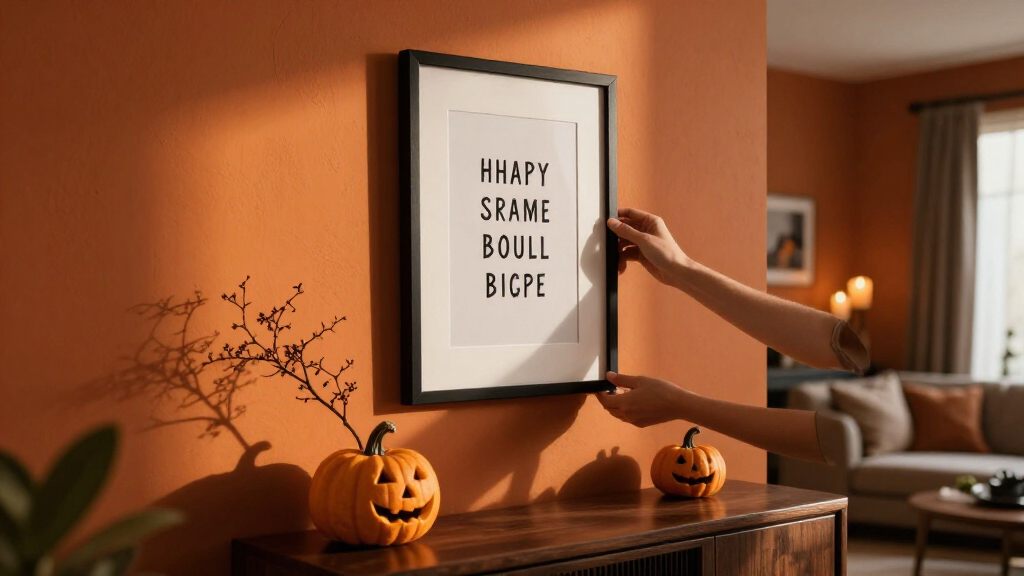
Create decorative Halloween quote prints by choosing short text, building a readable design, and printing it at home or through a print shop. This guide is for beginners who can use a basic design app and want finished prints for a wall, party table, or seasonal display. Allow 1–2 hours, including design, a test print, and finishing.

Get the little things that make your day delivered free with Prime
- Fast, free delivery on millions of items
- Prime Video, Amazon Music and more included
- Member-only deals all year

Please Do Not Summon Demons in the Bathroom Framed Canvas Wall Art, 12 × 16 Inches
- ✔ Dimensions: 16 × 12 inches
- ✔ Material: Canvas and wood
- ✔ Frame: Framed

XMJJQQ Halloween Witch and Bat Bathroom Canvas Wall Art, Unframed, 12 x 16 in
- ✔ Dimensions: 12 × 16 inches
- ✔ Material: Canvas
- ✔ Frame: Unframed
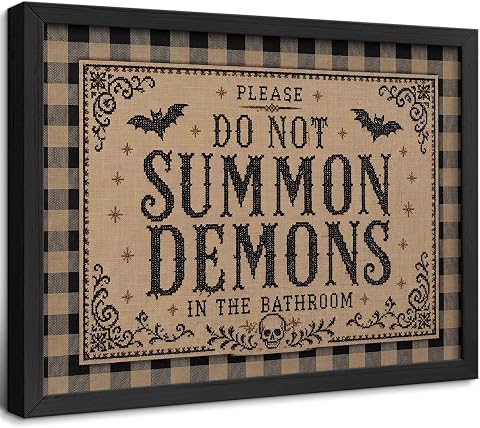
Gothic Funny Bathroom Framed Wall Art, 8 x 10 Inch
- ✔ Dimensions: 8 × 10 inches
- ✔ Material: Canvas
- ✔ Frame: Black solid wood
Difficulty: Beginner | Time: 1–2 hours
What You’ll Need
Tools & Materials:
- Computer, tablet, or phone
- Design app with text and page-size controls
- Printer or access to a print shop
- White or cream printer paper, cardstock, or photo paper
- Scissors or paper trimmer
- Optional frame, clips, or removable wall-safe hanging strips
Knowledge:
- Basic ability to type, save, and open a file
- Basic familiarity with selecting text and changing font size
Use original wording or text you have permission to reproduce. Check printer and paper compatibility before using thick cardstock. Set the document to the size you plan to print; changing size later can shift margins and text.
Please Do Not Summon Demons in the Bathroom Framed Canvas Wall Art, 12 × 16 Inches
For shoppers who want the Halloween joke to be unmistakable, YYNISPIN’s direct bathroom warning is the clearest match in this group. Its black-and-white design keeps the message at the center, while the 12 × 16-inch wood frame and included hooks make it more display-ready than XMJJQQ’s unframed canvas. Compared with the smaller ZCIRDYVV piece, this one has more room to read as a standalone wall accent.The tradeoff is that its humor is unusually specific: the demon-summoning line may be fun in a bathroom or dedicated Halloween display, but feel out of place in a more restrained room. Its landscape orientation also offers a different fit from XMJJQQ’s portrait canvas. The listing describes it as waterproof and fade resistant, though buyers should still judge placement by their room and the style of their decor. We rank it first for combining the most explicit quote with a frame and straightforward hanging setup.
Pros:
- Wood frame and hanging hooks are included
- Direct, humorous demon-summoning quote
- 12 × 16-inch size gives it more wall presence than the 8 × 10-inch option
- Listed as waterproof and fade resistant
Cons:
- The niche bathroom joke may not suit every room or decor style
- Black-and-white landscape design offers less color variation
Best for: Buyers who want a framed, ready-to-hang bathroom joke print with a clear spooky quote.
Not ideal for: Shoppers seeking subtle Halloween imagery, a portrait layout, or a quote that blends easily into varied decor.
Bottom line: Choose this framed canvas when a readable, unmistakably spooky bathroom quote matters more than a subtle or flexible design.
“Choose this framed canvas when a readable, unmistakably spooky bathroom quote matters more than a subtle or flexible design.”
XMJJQQ Halloween Witch and Bat Bathroom Canvas Wall Art, Unframed, 12 x 16 in
XMJJQQ gives us the most control over the finished presentation because its 12 × 16-inch canvas arrives unframed. That makes it a better starting point for shoppers matching an existing frame or choosing a finish that suits their bathroom. Its portrait format also stands apart from the landscape YYNISPIN and ZCIRDYVV pieces, so it may fit a narrower stretch of wall more naturally.The listing describes a witch-and-bat bathroom theme and archival pigment ink, positioning this as the more illustrated seasonal option. However, the description also refers to a playful summoning warning and a multi-scene treatment, so the exact visual emphasis is less clear from the supplied product information. Compared with YYNISPIN, it requires an extra framing decision; compared with ZCIRDYVV, it offers a larger canvas but no included frame. It makes most sense when custom styling matters more than immediate hanging.
Pros:
- 12 × 16-inch portrait format
- Unframed canvas allows a separately selected frame
- Listing specifies fade-resistant archival pigment ink
- Waterproof and durable features are stated
Cons:
- No frame is included, so display setup takes another step
- The description’s multi-scene details leave some uncertainty about the exact composition
- The witch-and-bat theme may read as more illustrated than quote-led
Best for: Buyers who want a 12 × 16-inch portrait canvas and plan to select their own frame or display method.
Not ideal for: Shoppers who want a finished framed print, included hanging hardware, or a precisely documented design before choosing.
Bottom line: Pick XMJJQQ if you want the largest portrait canvas and prefer to decide how it is framed, while accepting less certainty about the precise scene.
“Pick XMJJQQ if you want the largest portrait canvas and prefer to decide how it is framed, while accepting less certainty about the precise scene.”
Gothic Funny Bathroom Framed Wall Art, 8 x 10 Inch
ZCIRDYVV is the small-format choice for buyers who want a framed gothic accent rather than a large quote-led focal point. Bats, skull details, and a checkered background give it a busier vintage Halloween look than YYNISPIN’s simpler black-and-white message. It also arrives framed in black solid wood with hanging accessories, so it is easier to place than XMJJQQ, whose canvas is unframed.At 8 × 10 inches, though, it has less wall presence than either 12 × 16-inch option. That scale suits a narrow bathroom wall, a shelf arrangement, or a cluster of seasonal prints, but it is the weakest fit if we want one print to anchor a larger space. The description calls the artwork a humorous bathroom quote, yet does not specify the exact wording as clearly as YYNISPIN does. We rank it third because its frame and distinctive styling are useful, while its size and less explicit quote description make it a more specialized pick.
Pros:
- Black solid wood frame and hanging accessories are included
- Bats, skulls, and checkered background create a distinct vintage gothic look
- Compact size suits small spaces or layered arrangements
- Waterproof canvas surface is listed
Cons:
- 8 × 10 inches is smaller than both 12 × 16-inch alternatives
- Exact quote wording is not specified in the provided description
- Detailed humorous style may not suit more restrained interiors
Best for: Shoppers furnishing a small wall or building a layered Halloween display who want a framed gothic accent.
Not ideal for: Anyone seeking a large, clearly specified quote as the main feature of a wall.
Bottom line: Choose this print for a compact framed Halloween accent, but look to YYNISPIN for a larger and more clearly stated quote.
“Choose this print for a compact framed Halloween accent, but look to YYNISPIN for a larger and more clearly stated quote.”
As an Amazon Associate we earn from qualifying purchases.
Before You Start
Decide where the prints will go and measure the available frame or display area. Choose one or two print sizes, such as 5 × 7 inches or 8 × 10 inches. Keep text and important artwork away from the edges so home printers do not crop them. If the prints will be displayed near candles, use an electric candle or keep paper well away from flame and heat.
Step-by-Step Instructions
Step 1: Choose short Halloween quotes
Write down three to five short lines that fit the mood you want, such as eerie, playful, or gothic. Keep each quote brief enough to read from across the room. Check spelling, punctuation, and wording before designing. If you use a quotation from a published work, verify that you have permission for your intended use; writing your own line avoids that issue.
Tip: Aim for one main line and, if needed, a short attribution. Long passages are harder to read and may crowd the print.
Check: You have a small list of proofread quotes, each short enough to fit your chosen print size.
Step 2: Set up the page
Open your design app and create a new document using the exact print dimensions. Choose portrait or landscape orientation to suit the quote. Add guides or margins, leaving about a quarter inch clear around the edges for a home print. Save the document with a clear name so you can find the editable version later.
Tip: If you plan to frame the print, use the frame opening as your finished size and check whether the frame covers a narrow edge.
Check: The blank page matches the intended print dimensions and has a visible safe area for text.
Step 3: Build a readable layout
Add the quote as the main text and place it near the center of the page. Choose a decorative font for a few key words and a simpler font for the rest. Keep strong contrast, such as cream text on a dark background or black text on pale paper. Add a small number of Halloween details, such as a moon, leaves, or a simple silhouette, without letting them compete with the words. Make sure the smallest text remains easy to read at the finished size.
Tip: Use two font styles at most. Highly decorative lettering can be difficult to read when every word uses it.
Check: The quote is the first thing you notice, and all words remain legible when the design is viewed at actual print size.
Step 4: Check spacing and spelling
Read the quote aloud while checking each word against your original notes. Inspect punctuation, capitalization, line breaks, and any attribution. Zoom out or view the page at actual size to check that the text and artwork have breathing room. Move any important element that sits too close to the page edge.
Tip: A design can look balanced while zoomed in but feel crowded at actual size. Check both views.
Check: The text matches your approved wording, and nothing important touches or crosses the safe margin.
Step 5: Export a print file
Save the editable project, then export a print-ready PDF or high-resolution image at the document’s original dimensions. Use the app’s print-quality setting if available. Open the exported file and confirm that the page size, colors, fonts, and artwork appear as intended. Avoid resizing the file during export.
Tip: If the print shop requests a specific file type or bleed, follow its requirements and check the preview before ordering.
Check: The exported file opens correctly and shows the full design on a page of the intended size.
Step 6: Print a test copy
Print one copy on ordinary paper before using specialty stock. In the print dialog, select the correct paper size and orientation, and choose actual size or 100% scale. Turn off options such as fit to page if they would change the dimensions. Check the result for clipping, faint text, unexpected color shifts, or awkward line breaks.
Tip: Printer color can vary from the screen. A test copy reveals whether the contrast and background look right on your chosen paper.
Check: The test print is complete, correctly sized, unclipped, and readable from the intended viewing distance.
Step 7: Print and finish the set
Load the paper according to the printer’s instructions and select the matching paper type in the print settings. Print the final copies, then let ink dry before stacking or trimming them. Cut along the page edges with scissors or a paper trimmer. Place each print in a frame or hang it with a suitable removable strip or clip.
Tip: Feed thick paper only if your printer supports it, and use its manual feed slot when the instructions recommend one.
Check: The finished prints have clean edges, dry ink, consistent sizing, and secure placement in the display area.
Common Mistakes to Avoid
- Using ornate fonts for every line makes the quote hard to read. — Reserve decorative lettering for a short heading or a few emphasized words; use a simple font for the rest.
- Printing at a scaled size changes margins or clips the design. — Match the document and paper dimensions, then select actual size or 100% in the print dialog.
- Choosing dark ink on a dark background reduces contrast. — Use a test print and adjust the text or background until the words stand out clearly.
Troubleshooting
Problem: The printer cuts off part of the design.
Solution: Move text and artwork farther inside the page margins, confirm the paper size, and print at actual size. Check whether the printer supports borderless printing before placing content near the edge.
Problem: The print looks smaller or larger than expected.
Solution: Confirm the design dimensions and print-dialog paper size. Turn off fit-to-page scaling and select actual size or 100%, then print another test.
Problem: The colors look dull or different from the screen.
Solution: Try a brighter paper or stronger contrast, check the selected paper type and quality settings, and test a revised copy before printing the full set.
Problem: Ink smears after printing.
Solution: Use paper rated for your printer type, confirm the paper setting, and allow the print to dry flat before handling or stacking.
What Success Looks Like
The completed set contains correctly sized prints with proofread quotes, readable text, balanced spacing, and no clipped elements. Ink is dry, edges are neat, and each print is displayed securely where it can be seen without being exposed to flame or heat.
Next Steps
Store the editable files and exported print files in a folder labeled for Halloween so you can reuse or revise them next season. Remove hanging strips according to their instructions after display, and keep reusable prints flat in a dry folder or frame. If you make another set, reuse the page template and update the quotes, colors, or accents.
Frequently Asked Questions
What paper works best for Halloween quote prints?
Standard printer paper works for quick decorations. Cardstock feels sturdier, while photo paper can make colors look more vivid. Check that your printer supports the paper weight and finish before loading it.
Can I make the prints without a color printer?
Yes. Use black ink on white or cream paper, or create a design with simple line art and strong contrast. A monochrome layout can suit a gothic or vintage look.
How can I make small text easier to read?
Shorten the quote, increase the font size, and use a less ornate typeface. Print a test at the final dimensions and view it from the distance where people will see it.
Can I print these at a copy shop?
Yes. Export the design at the intended dimensions and ask the shop which file format and paper options it accepts. Review its proof or preview for page size, margins, and color before printing multiple copies.
Halloween Picks
halloween
As an affiliate, we earn on qualifying purchases.